
The Teacher Analytics Dashboard: Actionable Data, Zero Grading
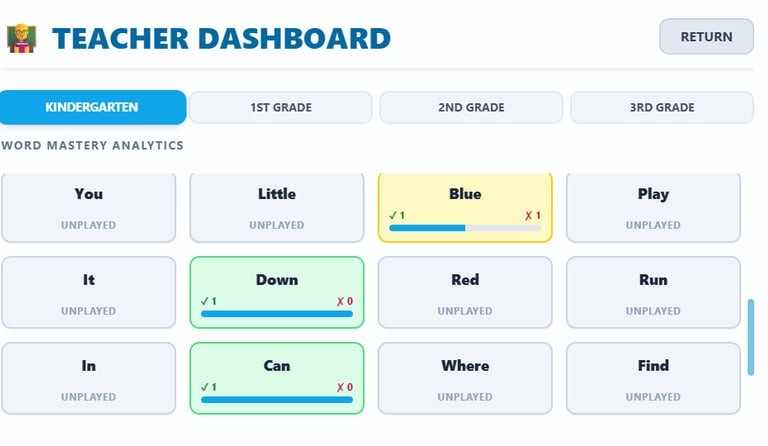
Stop guessing, start guiding. Game time shouldn't just be busy work—it should provide clear insights into where your students are succeeding and where they are getting stuck. The Mr. M L.A.B.S. Teacher Dashboard tracks every click, giving you a real-time, bird’s-eye view of your classroom's progress.
Key Features:
The "Struggle Spotlight": The dashboard automatically flags specific sight words or math problems that a high percentage of your class is missing. You can instantly use this data to plan tomorrow's warm-up or mini-lesson.
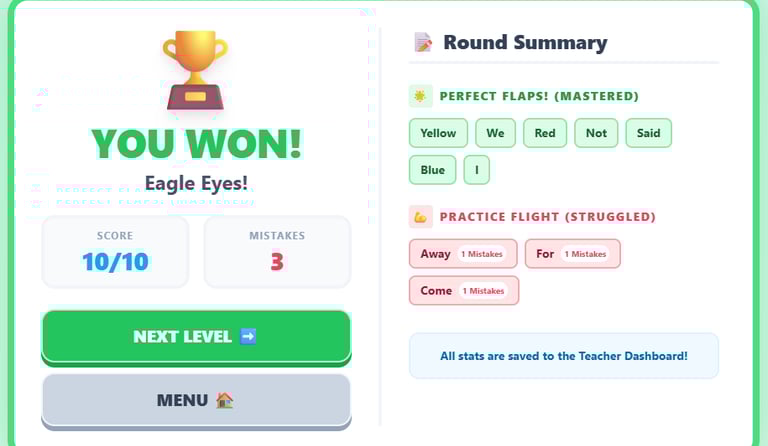
Individual Student Breakdowns: Click on any student’s name to see their exact accuracy rate. See a side-by-side list of the words they have mastered versus the words they are consistently missing.
Real-Time Progress Tracking: Watch your class's data update live as they play through the L.A.B.S. during center time or computer lab rotations.
Data-Driven Small Groups: Easily group students based on the specific words or skills they are struggling with, making your intervention blocks highly targeted and efficient.
Lesson Plan: The Sight Word Sprint
Focus: High-Frequency Word Recognition & Digital Dexterity L.A.B.S.: Bird Word Race Grade Level: Kindergarten - 3rd Grade
🎯 Learning Objectives
Visual Word Recognition: Students will instantly identify and select high-frequency sight words (Dolch/Fry lists) in a moving digital environment.
Cognitive Filtering: Students will practice rapid decision-making by distinguishing target words from distractors.
Digital Dexterity: Students will refine trackpad or mouse coordination to accurately navigate the character and catch the words.
⏱️ The Activity: The 100-Word Dash
1. The "Word Wall" Warm-up (5 Mins)
Teacher Intro: Before opening the laptops, select 5 target sight words for the day. Write them on the board and have the class read them aloud together. Tell the students: "Today, our bird needs to build its nest, but it can only use real sight words. If you catch a word, you have to read it in your head!"
2. The Race (15 Mins)
Phase 1 (Exploration): Students focus on controlling the bird and understanding the movement mechanics.
Phase 2 (Accuracy over Speed): Students are tasked with finding specific high-frequency words and avoiding random clicking.
Phase 3 (The 100-Word Goal): Students build reading stamina by staying on task until they catch 100 sight words.
3. Reflection & Cool Down (5 Mins)
Have students turn to a partner and share one tricky word they caught during the game.
✅ Success Criteria
The Fledgling: Successfully navigated the game and caught 50 sight words.
The Navigator: Reached the 100-word goal while demonstrating controlled trackpad/mouse movements.
The Speed Reader: Reached the 100-word goal and can correctly read aloud 3 of the words they caught to the teacher.
🎓 Mr. M’s Teacher Pro-Tip:
This is the ultimate independent literacy center. Because it is self-paced and ad-free, you can confidently assign this to early finishers or a small group while you run guided reading groups without worrying about students clicking on inappropriate pop-ups.
📚 Common Core State Standards (CCSS) Alignment
Reading: Foundational Skills (Print Concepts & Phonics)
CCSS.ELA-LITERACY.RF.K.3.C: Read common high-frequency words by sight (e.g., the, of, to, you, she, my, is, are, do, does).
Lab Application: Constant visual exposure and interactive selection of K-level sight words.
CCSS.ELA-LITERACY.RF.1.3.G & RF.2.3.F: Recognize and read grade-appropriate irregularly spelled words.
Lab Application: Game mechanics require instant recognition of words that cannot easily be sounded out, rewarding students for memorized visual recall.
Technology & Motor Skills (NJSLS & General Tech)
Application: Develops essential fine motor skills, hand-eye coordination, and spatial awareness required for navigating a mouse or trackpad in early elementary digital assessments.
Contact info
Questions? Reach out to me anytime, I'm here to help.
Email me
mrm@mrmlabs.org
© 2026. All rights reserved.